

Every bed, every house, on one board.
Who's in which bed, who's reserved to move in, and what's open today, across all your houses. Click any bed to assign, reserve, swap or move someone out.
7-day free trial · No credit card · One flat price for the whole house
Why the whiteboard stops working
A whiteboard works for one house. Then you open a second one, a bed gets promised to two people, and a case manager calls on a Saturday asking how many beds are open in the men's house, and you have to call the house manager to find out.
The bed board in HopeLinx answers that on one screen. It's one row per bed across every house you run, and it's the same record the rest of the sober living software uses, so intake, dues and discharges all read from it instead of from someone's memory.
One row per bed, with the counts at the top
The board lists every bed you have access to, with the house, room, bed, resident, move-in date and projected discharge date. The header keeps a running count of total, occupied, reserved and vacant beds. Search by resident, house, room or bed, sort any column, and add the columns you care about, like Available On or Gender, from Manage Columns.
Click a bed and its actions are right there. An empty bed can be assigned or reserved. A reserved bed can be moved into. An occupied bed can be swapped, reserved for whoever's next or emptied, and you can email or text the resident from the same panel.
- Total, occupied, reserved and vacant counts
- About 50 optional columns
- Export to CSV or print
- A card layout on phones
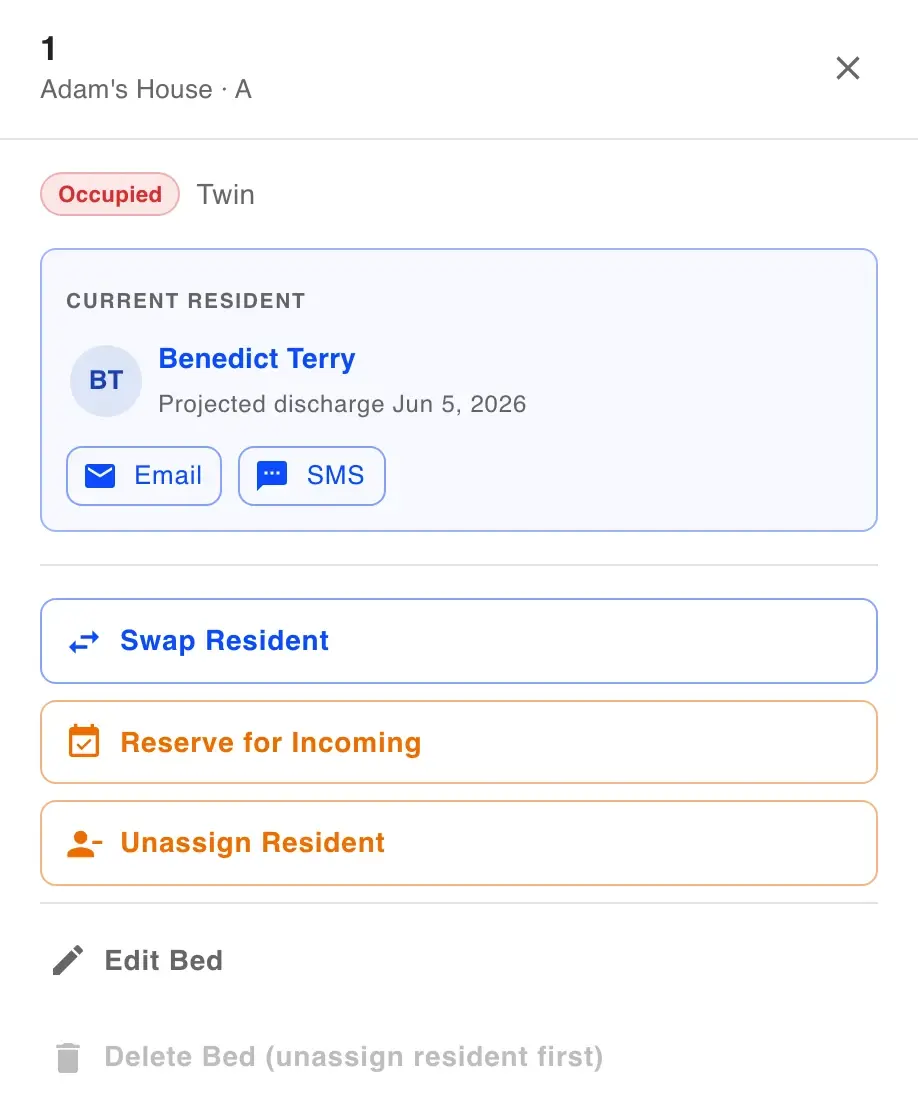
Hold a bed for the person moving in Friday
Reserve an empty bed for a pending applicant, or add the person right there with a name and a way to reach them. Add an expected move-in date and a note. You can also reserve an occupied bed for whoever comes next, and when the current resident moves out, the bed shows Reserved · Ready.
A reserved bed can't be handed to someone else at intake, and it isn't shown as open to referral partners. If you collect dues in HopeLinx, you can take a deposit when you reserve: log it, charge a card or email a payment link. Optional reminders can go to the incoming resident and your staff a few days before move-in.
Moves and discharges without losing the history
Move In walks you through approving the resident and puts them in the bed. Reassign Housing moves someone to any open bed in any house, and Swap Resident trades two occupied beds, even across houses. Every move is logged in the resident's occupancy history and isn't counted as a discharge.
At move-out you record the date, a reason and a status of Successful, Unsuccessful or Other. The bed opens right away, the resident's login is turned off, and their records stay. If they come back, reactivate them with a new move-in date, and their earlier stays stay on file.
- Move In from a reservation
- Moves and swaps across houses
- A reason and status on every discharge
- Reactivation for returning residents
Tell referral partners what's open without a phone call
From a property, create a private link that shows only the houses and details you choose: address, gender, bed counts and an occupancy bar. It expires after 7, 30 or 90 days, you can revoke it any time, and it never shows resident information.
For your own numbers, the dashboard shows available beds, occupancy rate and occupancy by house. The occupancy and census reports export as CSV or PDF, and the census can be emailed to you daily, weekly or monthly.
What it doesn't do (yet)
- No ranked waitlist. You can see pending applicants and approved residents without a bed, but HopeLinx doesn't queue them or offer beds automatically.
- No floor-plan view. The board is a table, and cards on a phone.
- No out-of-service status for a bed that's being repaired.
- Filtering is by search, such as a house name, rather than dropdown filters.
- The board doesn't push live updates to other open screens. It's current whenever you open it or make a change.
- Houses can be marked Male, Female or Co-ed, but HopeLinx doesn't block an assignment that doesn't match.
Bed board questions
Beds, reservations and move-outs.
Can I see all my houses on one screen?
Can I hold a bed for someone who hasn't moved in yet?
Is there a waitlist?
What happens when someone moves out?
Can I move a resident to another house?
Can I share open beds with referral partners?
Can I limit an admin to certain houses?
Can I export occupancy?
Still have questions?
We're happy to walk you through anything — setup, pricing, or compliance.
The rest of the house, in the same system
Rent & dues
Weekly or monthly dues, card and Cash App Pay into your own Stripe account, and cash logged with a receipt.
How dues collection worksApplications
One link for the application, signatures and uploads, landing in a pending list for your staff.
How applications workShift reports
Shift reports, bed-check rounds and chores, dated and searchable by house.
How shift reports workHow prices compare
Eight sober living software vendors, their published prices, and what each costs at 8, 30 and 120 beds.
See the comparisonKnow what's open before the phone rings.
Try it free for 7 days with no credit card. Bring your houses and residents with you, and we'll help move the data over.