

Collect sober living dues with a lot less chasing.
Dues post on schedule. Residents pay by card or Cash App Pay straight into your Stripe account, staff log cash and money orders with a receipt, and every resident has one running balance.
7-day free trial · No credit card · One flat price for the whole house
What collecting dues actually looks like
Most sober living houses collect every week. One resident pays on Friday, another pays half now and half on Tuesday, and someone's mom sends money from two states away. It comes in through Cash App, envelopes, money orders and the occasional promise. Keeping one honest balance per person across all of that is the part that eats your evenings.
HopeLinx is sober living software built by an operator who has done that job. Its money side, called Memberships in the app, gives every resident a plan, a ledger and a balance that updates whenever a payment comes in, however it comes in.
Weekly, bi-weekly or monthly dues that post on their own
Set up plans once, like Weekly 200 or Monthly 650, and give each resident a plan and a first due date. From then on, dues post on schedule. A plan can run a set number of times and then move the resident onto a different plan, which covers a higher first-week rate or a step-down after the first phase.
Payments settle the oldest charges first. Anything extra becomes credit, so paying ahead just works. A replacement key or a late fee goes on as a custom charge, and when a due should be forgiven, staff waive it and the balance reflects it.
- Weekly, bi-weekly, monthly and one-time plans
- Partial payments and pay-ahead credit, applied automatically
- Custom charges for late fees, damages or keys
- One running balance per resident, backed by a full ledger
Card and Cash App Pay, paid into your own Stripe account
You connect your own Stripe account, and every online payment is made on that account, so the money goes to you on Stripe's payout schedule. HopeLinx adds no platform fee and takes no percentage of rent or dues. You pay Stripe's processing fees and your flat HopeLinx subscription, and nothing else.
If you'd rather the payer cover processing, one switch passes the fee on, and residents see the breakdown before they pay. Some states restrict card surcharges, so check yours before you turn it on.
Once you allow it, residents can save a card and switch on autopay. It runs once a day at a time you pick. If a charge fails, the resident gets an email and it shows up on your dashboard, so you hear about it that day instead of at the end of the month.
- Card payments, plus Cash App Pay once Stripe enables it for you
- No HopeLinx cut of any payment
- Optional fee pass-through to the payer
- Autopay from a saved card
Cash, money orders, and the parent paying from out of state
Plenty of residents still pay in person. Staff log cash, checks, money orders, Venmo, scholarships and service work against the balance, with an optional photo of the check or money order. Every payment, cash included, emails the resident a PDF receipt.
When someone else is paying, generate a pay link from the resident's profile. It stays good for anywhere from two weeks to a year. A parent or sponsor opens it, enters the access code and pays by card or Cash App Pay without making an account. They get a receipt, and the payment lands on the resident's ledger like any other.
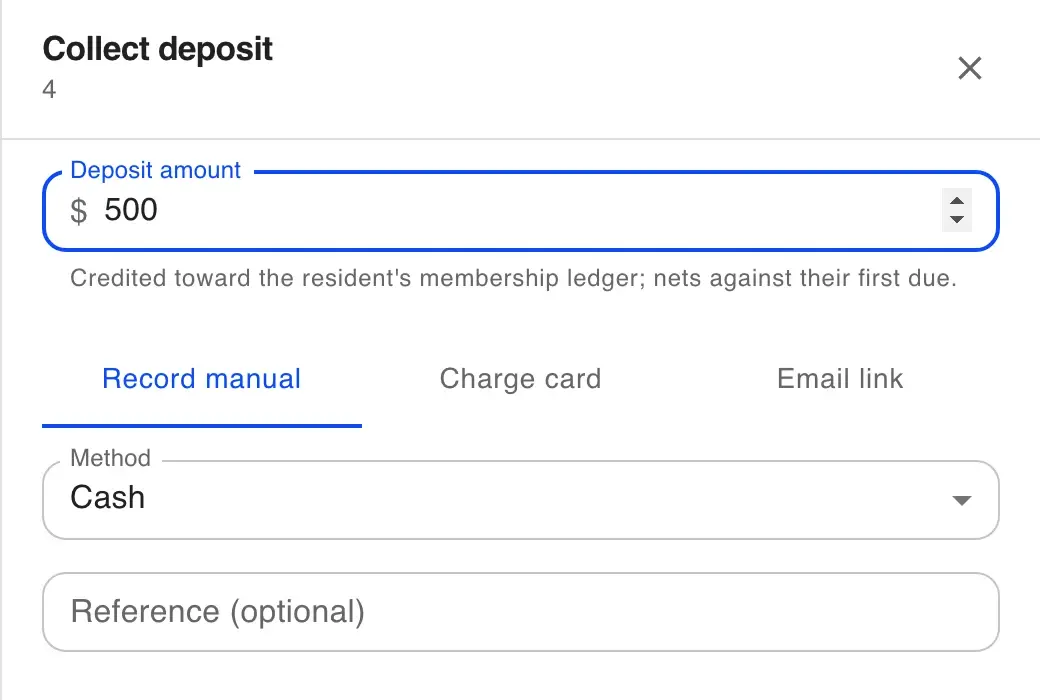
Deposits work the same way. When you reserve a bed you can log a deposit, charge a card or email a payment link, and the deposit is credited toward the first due.
Reminders that go out on their own, and numbers you can hand off
Upcoming-due reminders go out one to seven days before a due date, and balance reminders repeat every 3 to 30 days until it's paid. Residents get them by email, text or both, and you get an alert when someone falls overdue.
The dashboard shows outstanding dues, what's overdue, what's due in the next 7 days and what came in this month. Residents can download a statement for all their activity or a single month. When your bookkeeper asks, export the membership list or build a custom report and download it as a CSV.
- Upcoming-due and outstanding-balance reminders
- Email and text, on the schedule you set
- Dashboard cards for outstanding, overdue and collected
- Resident statements and CSV exports
What it doesn't do (yet)
- No ACH or bank transfers, and no Apple Pay or Google Pay. Online payments are card and Cash App Pay.
- No automatic late fees. Staff add them as a custom charge when they apply.
- No proration. Dues start on the first due date you pick.
- No QuickBooks or Xero sync today. You export CSVs for your bookkeeper.
- Online payments need your own Stripe account connected, and Cash App Pay appears once Stripe approves it for you.
- Autopay, pay links, reminders and fee pass-through are part of Memberships. HopeLinx also has an older, simpler monthly rent mode that doesn't include them.
Rent and dues questions
The money questions operators ask first.
Does HopeLinx take a cut of rent or dues?
Can residents pay with Cash App?
Can a parent or sponsor pay for a resident?
Do you support weekly dues?
Can I still take cash and money orders?
Can I pass the card processing fee to the resident?
Is there autopay?
Does it sync with QuickBooks?
Still have questions?
We're happy to walk you through anything — setup, pricing, or compliance.
The rest of the house, in the same system
Bed board
Every bed in every house: who's in it, who's moving in, and what's open today.
How the bed board worksApplications
One link for the application, signatures and uploads, landing in a pending list for your staff.
How applications workShift reports
Shift reports, bed-check rounds and chores, dated and searchable by house.
How shift reports workHow prices compare
Eight sober living software vendors, their published prices, and what each costs at 8, 30 and 120 beds.
See the comparisonStop keeping the balance in your head.
Try it free for 7 days with no credit card. We'll move your residents and their balances over with you.